Local Multiplayer Board Games: How to Play Together in One Room, on One Screen or Many
By The Rondovo team · Published · Updated · 14 min read
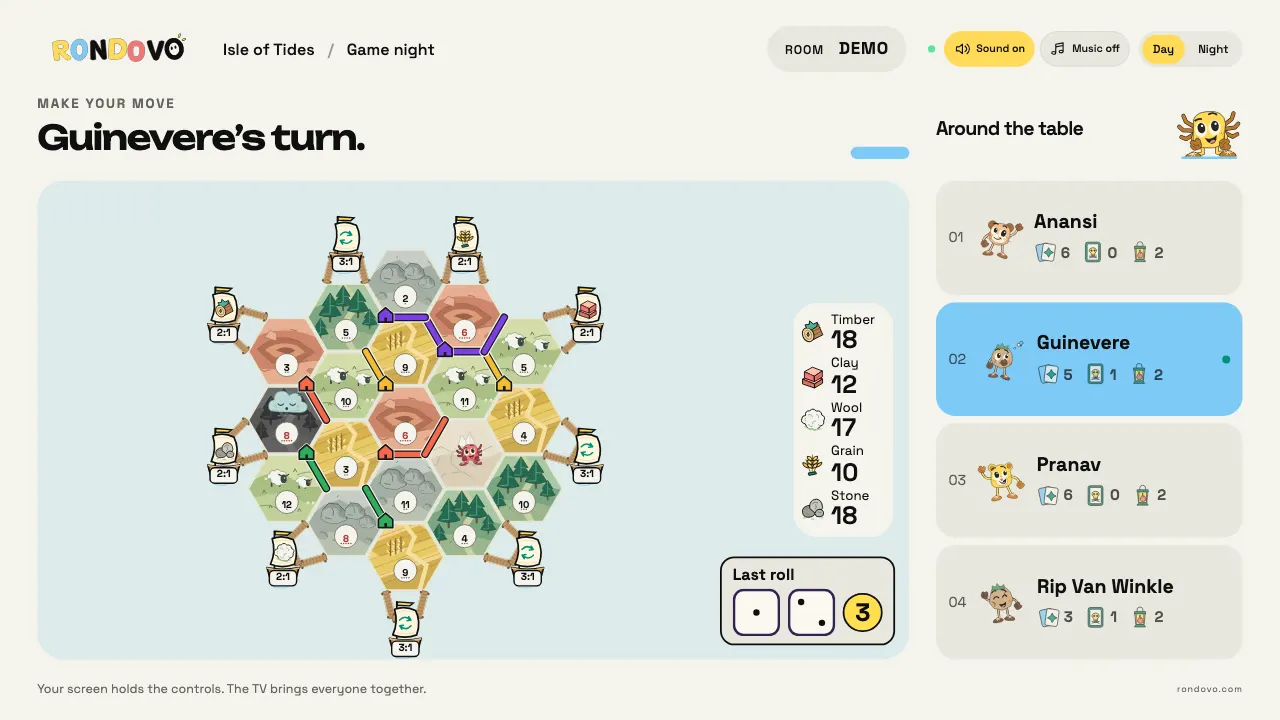
Local multiplayer board games are digital board games that several people play together in the same room, rather than online from different homes. There are three ways to do it: pass one device around (pass and play), put the board on a shared screen like a TV while everyone holds a personal screen for their hand, or sit on the couch with a PC or console game. The right choice depends mostly on one thing: does the game have hidden information, like cards in hand or secret roles? If it does, you want personal screens.
In short
- Pass and play needs one tablet or laptop and works best for games where nothing is secret: Ludo, Carcassonne, connect four style games.
- A shared screen plus personal screens is the way to play card games and anything with secret hands, routes or roles. Jackbox, AirConsole, the official Clue game's companion app and browser sites like Rondovo work this way.
- Couch PC games such as Tabletop Simulator or the official Wingspan and Ticket to Ride apps cost $10 to $20 each on Steam (as of October 2026), and only one person needs to own them for local play on one machine.
- Free options exist on every route: Ludo King for pass and play, Board Game Arena for one device each, and Rondovo for a TV or laptop as the board with everyone's own screen in hand.
What "local multiplayer" means for board games
In video games, local multiplayer usually means split screen or several controllers on one console. Board games bend that idea, because a board game has two kinds of information. Public information sits on the table: the map, the tokens, the score track. Private information sits in your hand: cards, secret objectives, a role you must not reveal.
A digital board game played locally has to put both somewhere. Each setup below solves that differently.
Pass and play (hotseat)
One device sits in the middle. On your turn you pick it up, make your move, and hand it on. The PC version of the same idea is called hotseat: everyone shares a mouse and takes turns at the keyboard.
It is the oldest form of local multiplayer and still the simplest. Nobody needs their own device, nobody joins anything, and many official board game apps include it for free.
A shared screen with personal screens
The board goes on something big that everyone can see: a TV, a laptop propped up at the end of the table, a tablet on a stand. Each player then uses a second, personal screen (usually a phone) as a controller and as a private hand. This is how Jackbox works, how AirConsole works, and how Marmalade's Clue lets up to six phones join as controllers with a private clue sheet each.
Couch play on PC or console
A PC or console game drives the TV and players share controllers or take turns at one machine. Some official board game adaptations do this, and a few add a free companion app so your cards can sit on your phone instead of on the TV.
Why hidden information needs personal screens
Try playing a card game on one shared tablet and the problem shows up on the first turn. Your hand appears on screen, and everyone else at the table has to look away. Pass and play runs on the honour system. Apps soften it with a "hand the device to Sam" screen between turns, but the moment you lean over to plan your move, so can the person next to you.
For some games that barely matters. In Ludo, connect four or a dots and boxes game, everything is already on the board. There is nothing to hide.
For others it breaks the game:
- Card games (anything like Uno, Phase 10 or rummy) are built on not knowing what other people hold.
- Route games like Ticket to Ride hide which cities you are trying to connect. Once someone sees your tickets, they know which lines to block.
- Engine builders like Splendor let you reserve cards face down.
- Social deduction (Mafia, Werewolf) is impossible: the whole game is a secret role.
The fix is simple. Give every player a screen of their own for the private part and keep the public part on the shared one. That is why phones as controllers became the standard for party games, and why it suits board games with hands just as well.
The three setups compared
| Setup | What you need | Best for | Weak spot |
|---|---|---|---|
| One tablet passed around | A single tablet or laptop | Open games: Ludo, tile laying, abstract strategy | Hidden hands rely on people looking away; slow with 5+ players |
| TV or laptop plus everyone's own device | A big screen and one device per player | Card games, secret routes, roles, bigger groups | Everyone needs a charged device and the same Wi-Fi or data |
| Laptop on the table, hotseat | One PC with the game installed | Longer strategy games with 2 to 4 players | One mouse; small screen for a group; hands visible |
One tablet is the best fit for two to four people at a kitchen table, especially with kids. It also needs no internet once the app is installed, which matters on trains and holidays.
A TV plus personal screens is the best fit once you have more than four players, or any game with cards. Everyone can plan on their own screen while someone else is taking their turn, so the game moves faster. The cost is one device per player, though most groups already carry one each.
A laptop on the table sits between the two. The screen is bigger than a tablet and the PC catalogue of official board games is large, but it is awkward for more than three people to read one laptop, and the mouse becomes the bottleneck.
Local multiplayer board game options, platform by platform
Prices below were checked on official store pages and are as of October 2026. Store prices change with sales and by region, so treat them as the list price in US dollars.
Official digital board games with pass and play
- Carcassonne: The Official Board Game (Steam, $9.99). The Steam page lists pass and play on the same device. Tile laying has almost no hidden information, so it is one of the best board games for a shared screen.
- Ticket to Ride (Steam, the 2023 edition, $14.99). The developer's own FAQ lists pass and play and local play, and the store page describes couch play boosted by a free companion app. Note that the older Classic Edition is no longer sold on Steam.
- Wingspan (Steam, $19.99, 1 to 5 players). Tagged for local multiplayer and shared screen play on Steam. A calm game that works well with a slow pass around a laptop.
- Tsuro (mobile and PC). The mobile listing supports up to eight players around one device. You hold a small hand of tiles, but the game is short and forgiving, so pass and play holds up.
- Ludo King (iOS, Android, free). Offers offline multiplayer alongside online play. Ludo has no hidden information, so one device is all you need.
Shared screen games with phones as controllers
- Clue by Marmalade Game Studio (Steam, Switch, PlayStation, Xbox). A free companion app on iOS and Android lets players join a local game and keep their cards and notes private. The older Cluedo version supports up to six phones as controllers. We could not confirm a current price, so check the store.
- The Jackbox Party Packs (Steam and consoles; Party Pack 11 launched at $29.99 in October 2025). Only the host buys the pack. Everyone else joins at jackbox.tv with a room code. These are party games, not board games, but most phone controller games follow the same setup. See the official Jackbox how to play page.
- AirConsole (browser on a computer or Android TV, free to try, with a paid Hero subscription). Phones become gamepads after you enter the session code. Its library leans toward arcade and party games rather than classic board games.
PC couch and virtual tables
- Tabletop Simulator (Steam, $19.99, or $59.99 for a four pack). Its hotseat mode plays locally on one computer, and up to 10 players can sit at a table. It is a physics sandbox rather than a rules engine, so you enforce the rules yourselves.
Browser options, one device each
- Board Game Arena (browser, free account, Premium was $5 a month per BGA's own forum announcement in 2025). A huge library of licensed board games. Each player logs in on their own device, which keeps hands private, and everyone needs an account. Some games can only be started by Premium members, although free players can join those tables.
- Rondovo (browser, free). A host opens a room, everyone joins with a four letter code on any device, and a TV or laptop can be the shared board. No account for guests and nothing to install. More on how it works below.
The full comparison
| Option | Players | Price (Oct 2026) | Hidden hands kept private? | Devices needed |
|---|---|---|---|---|
| Carcassonne (Steam) | 2 to 5 in the board game | $9.99 | Little to hide | One PC |
| Ticket to Ride (Steam) | 2 to 5 in the board game | $14.99 | Free companion app for couch play | One PC, plus a phone each for the app |
| Wingspan (Steam) | 1 to 5 | $19.99 | No, on a shared screen | One PC |
| Tabletop Simulator | Up to 10 per table | $19.99 | No, in hotseat | One PC |
| Clue (Marmalade) | Up to 6 phones in the Cluedo version | Check store | Yes, companion app | Console or PC, plus a phone each |
| Ludo King | Not stated | Free | Nothing to hide | One phone or tablet |
| Jackbox Party Pack 11 | Varies by game | $29.99 at launch | Yes | One host device and a TV, plus a phone each |
| AirConsole | Not stated | Free to try, Hero subscription | Yes | Computer or Android TV, plus a phone each |
| Board Game Arena | Varies by game | Free, Premium $5 a month | Yes | One device each, account each |
| Rondovo | 2 to 16 depending on game | Free | Yes | One device each; TV or laptop optional |
In practice: pass and play is cheap and simple but leaks hidden information. Personal screens keep secrets but ask every player to have a device. Official apps give you the real branded game; free browser sites give you quick setup with no purchase.
Where Rondovo fits
Rondovo is our free site of party, board and card games built for exactly this room. Here is how a local game works:
- One person hosts. They open rondovo.com, pick a game and get a four letter room code.
- Everyone joins on their own screen. Any device with a browser works. Guests type a name and they are in. No app, no account.
- Pick where the board goes. The host's lobby asks "Where will everyone watch?" Choose A shared TV and the board shows on the TV while each player's screen becomes their controller and private hand. Choose Just this screen and there is no TV at all: the board and your controls sit together on your own screen. On a laptop the same choice reads "Play on this laptop" or "Use a TV too". For the TV, open rondovo.com/tv in the TV's own browser (or a laptop plugged into it) and add it to the room; there is no app to install from a TV store.
What the private screen holds depends on the game. In Isle of Tides your resource cards and charts, including any hidden Beacon worth a lantern, never reach the TV, which only shows how many each player holds. In Prism, a card you reserve from the top of a deck stays face down for everyone else. In Night Express your secret routes live on your own screen. In Showdown!, Summit and Low Deck, your hand or hidden cards stay with you.
Where Rondovo is weaker. It is not pass and play. Every player joins as their own seat, so you need one device per person. If your group has a single tablet and nothing else, Ludo King or an official app with pass and play is the better answer tonight. The host can add bots to fill seats, but that is playing against the computer, not with friends. And our games are our own takes on familiar ideas, not the licensed originals: if your group wants real Catan or real Ticket to Ride, buy the official app.
What Rondovo does well: it costs nothing, it runs in any browser, everyone's devices can join in under a minute, and the private part of each game stays private.
Our board games for local play, by group
These are all on the Board games shelf, played turn by turn. Player counts and times come straight from each game's page.
For families and mixed ages
- Ludo (2 to 4 players, about 30 minutes). Roll a six to come out, knock rivals home. Our version has a twist by default: your home column only opens after you have sent someone back. Read our Ludo rules guide first if your family plays a different way.
- Ashta Chamma (2 to 4, about 30 minutes). The South Indian cowrie shell race. Four shells, a five by five board (or seven by seven for the long walk), and a race to the centre.
- Dotty (2 to 4, about 8 minutes). Dots and boxes with a die: roll, then draw that many lines.
- Drop Four (2 to 8, about 10 minutes). Four in a row. With three or more people it splits into two teams who take turns in rotation.
For strategy players
- Isle of Tides (2 to 6, about 60 minutes). Settle a hex island, trade at the docks, first to ten lanterns. Our own take on the island trading genre; see games like Catan for the official options too.
- Night Express (2 to 5, about 45 minutes). Claim rail lines across the USA and connect secret routes. The Express lines pay a bonus but can only be claimed while the Signal is green.
- Prism (2 to 4, about 40 minutes). Take gem chips, buy cards that discount later cards, win Patrons. First to 15 prestige.
- Atlas (2 to 6, about 45 minutes). Buy city plots, own a district to double its rent, build to raise it more. The host picks the number of laps, so it ends on time.
For card game groups
- Showdown! (2 to 10, about 25 minutes). Match colour or number and remember to press Showdown! when you are down to one card.
- Summit (2 to 6, about 45 minutes). Ten stages of sets, runs and colours, one stage a hand.
- Low Deck (2 to 8, about 30 minutes). Twelve hidden cards each, lowest total wins.
- AfterMath (2 to 12, about 30 minutes). Play a card, claim its square, make five in a row. Four or more play in teams.
For word lovers
- Wordsmith (2 to 4, about 45 minutes). Crossword style tile laying with your rack of seven on your own screen, so nobody sees your letters.
Pick for tonight: by player count and time
| Players | Under 15 minutes | 30 to 45 minutes | An hour or more |
|---|---|---|---|
| 2 | Dotty, Drop Four | Prism, Low Deck | Isle of Tides |
| 3 to 4 | Dotty, Drop Four (teams) | Ludo, Ashta Chamma, Wordsmith, Night Express | Isle of Tides |
| 5 to 6 | Drop Four (teams) | Summit, Atlas, Showdown! | Isle of Tides (up to 6) |
| 7 to 10 | Drop Four (teams, up to 8) | Showdown!, AfterMath (teams), Low Deck (up to 8) | Several rounds of AfterMath |
| 11 to 12 | AfterMath in three teams |
A few rules of thumb from running these:
- Mixed ages, one evening: start with Drop Four as a warm up, then Ludo. Our board games for groups guide covers boxed games for the same table.
- Two people who like to think: Prism. It is tight with two.
- A big group that wants a board game, not a party game: AfterMath in teams. Up to 12 players and everyone has a hand to plan with.
- If the group has more than 12, switch to party games, which on Rondovo take up to 16. Our party games for large groups guide has picks.
Questions people ask
What are local multiplayer board games?
They are digital board games played by several people in the same room. That can mean passing one tablet around, sharing a TV while each player holds a personal screen, or taking turns at one PC or console.
Can you play board games on one screen with friends?
Yes. Many official apps include pass and play, such as Carcassonne on Steam. It works best for games without hidden cards, because everyone can see the screen on your turn.
What are the best local multiplayer games with phones as controllers?
For party games, the Jackbox Party Packs and AirConsole. For board and card games, Marmalade's Clue with its companion app, and browser sites like Board Game Arena and Rondovo, where each player's device holds their hand.
Do all players need to own the game?
Not for local play. With pass and play or hotseat, one copy on one device is enough. With Jackbox, only the host buys a pack. Board Game Arena needs a free account per player, and Rondovo needs no account for guests.
Are there free local multiplayer board games?
Yes. Ludo King is free on iOS and Android, Board Game Arena has a free tier, and Rondovo is free in the browser. For more free choices played over the internet, see our free board games online with friends guide.
Can I play local multiplayer board games on a TV without a console?
Yes. A laptop connected to the TV, or a smart TV's browser, can show a browser game as the board. Our guide to TV games without a console walks through the setups.
What are good couch multiplayer board games on PC?
Carcassonne, Ticket to Ride and Wingspan all have official Steam versions with local play, priced from $9.99 to $19.99 as of October 2026. Tabletop Simulator covers almost any board game in hotseat mode if you are happy to enforce the rules yourselves.
Carcassonne, Ticket to Ride, Wingspan, Tsuro, Ludo King, Clue, Cluedo, Jackbox, Jackbox Party Pack, AirConsole, Tabletop Simulator, Board Game Arena, Steam, Catan, Splendor, Uno, Phase 10, Nintendo Switch, PlayStation and Xbox are trademarks of their owners. Rondovo is not affiliated with them.